
In this post we are see how to create new team project in Team foundation server 2012 from Visual Studio 2012.


Add Users to a Team Project


- Open the Visual Studio 2012
- In the Connection to Team Project dialog box, click Servers.
- In the Add/Remove Team Foundation Server dialog box, click Add.
- In the Add Team Foundation Server dialog box, provide the details of your TFS instance, and then click OK.
- In the Add/Remove Team Foundation Server dialog box, click Close.
- In the Connect to Team Project dialog box, select the TFS instance you want to connect to, select the team project collection you want to add to, and then click Connect.
- In the Team Explorer window, click New Team Project.
- In the New Team Project dialog box, provide a name and a description for the team project, and then click Next.
- On the Select a Process Template page, select the process template that you want to use to manage the development process, and then click Next.
- On the Team Site Settings page, leave the default settings unchanged, and then click Next.
- On the Specify Source Control Settings page, leave the default settings unchanged, and then click Next.
- On the Confirm Team Project Settings page, click Finish.
- When the new team project is successfully created, on the Team Project Created page, click Close.
Now Team project is created , now we will add some users to Team Project. this is also can be done through Visual Studio 2012
Add Users to a Team Project
- Open VS 2012 >> go to team explorer >> click Home Button >> Settings
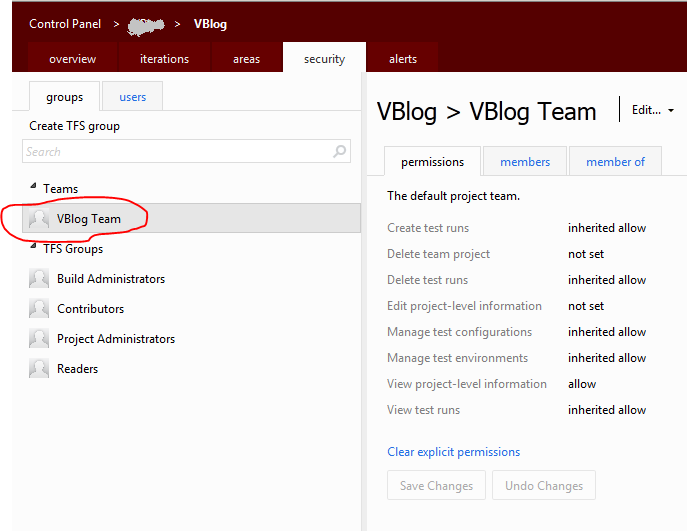
- Click Group Membership, it will open a web page. (http://"TFS Server"/tfs/"Team Project Collection"/"Team Project Name"/_admin/_security )
Substitute the values for "TFS Server", ""Team Project Collection" and " Team Project Name".
- Sign In As “Admin User” , or else you will not have enough privilege to assign the team members
- Click Teams Group (VBlog Team) and add members one by one.
- Add the same group("VBlog Team") to “Contributors”, or else they can’t add, modify …etc.
once we have added members to tha VBlog Team , add that team to other gorups ("Contributors", "Reader" and etc)
